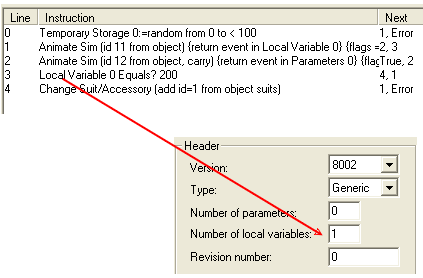
WEEK 4: Adding New Behaviors and Menu OptionsTime To TestYour chair should create a fire on demand (by choosing "Burn" from the menu), therefore, make sure you're testing near a smoke alarm, or with a Sim who isn't so lazy he will not extinguish the fire on command. You should also test burning the chair while a Sim is sitting in the chair. The way we've positioned the fire being created should give the sitting Sim the opportunity to quickly jump out of the way. (Unless he's a sloth.) So, keep your fingers crossed, and let's hope everything works as intended. If the Burn interaction does not work properly, STOP and ask for help before proceding. VARIABLES, PARAMETERS, ATTRIBUTES & CONSTANTSWe are going to break off from working on our chair to take a look at variables, parameters, attributes and have a little refresher on constants. This is a bit of information that will come in handy later on and it is quite okay if you don't "get it" right away. As long as you have this information, somewhere down the road when we encounter them in objects, things will begin to click. VariablesLocal Variable: This one is perhaps the easiest to get confused on. A Local Variable are called such because it is found in the behavior where it is mentioned and affects only that behavior. If you were to insert a new behavior to be run from the behavior where the Local Variable exists, the new behavior would not be affected in any way by the variable. The number of Local Variables being used within a BHAV must be declared in the BHAV's header, the window frame to the upper right in the Behavior editor.
|