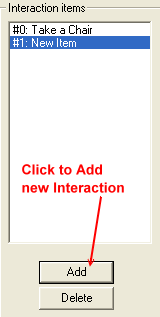
WEEK 4: Adding New Behaviors and Menu OptionsCREATING A NEW MENU OPTIONSelect the TTAB (Tree Table) section, and then double click "Chair - Dining - Cheap tree table". Click the "Add" button under the Interaction items box:
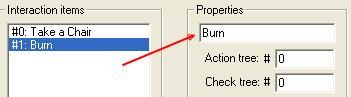
Doing so will give you a new line: #1: New Item. We need to give "new item" a better description, so go over to the right under "Properties" and replace "New Item" with "Burn".
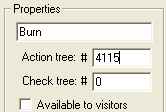
Next, we fill in the Action and Check tree numbers. Our Burn behavior is #4115, so we enter that number into the Action tree # box, and since we don't have a Check tree #, we leave the zero in there. We don't have a check tree because there are no conditions to be met for the fire to be created. This is one of those "do it and don't ask any questions" situations.
|