WEEK 3: Object Behavior Modification and Adding Motives
Adding New Sounds (continued)
The Add Item window will pop up. Please fill in the boxes so that
your window looks like mine.
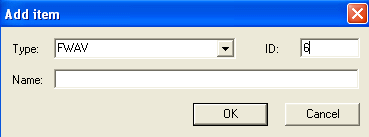
Fig. 1.49
We chose FWAV from the "Type" pull down menu, because
this is a WAVE (sound) file. In the ID box, we inserted the number 6, because
there are already 5 sounds in the chair, and since all those are needed (we shouldn't
override them), we will use the next available number for reference — the
number 6. The Name box we are leaving empty, just like the other sounds already
there. None of them have descriptions. Hence, your FWAV window will now look like
this:
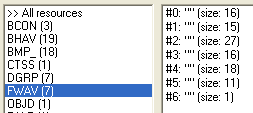
Fig. 1.50
See how each sound file has a (size:16), etc. at the end? Ours
doesn't. Ours is a mere 1. This is because although we have added the slot
that will contain our sound reference, we have not
yet added the actual call to the sound (the sound name).
Note: We cannot import actual sound
files into these slots. Well, actually we can, but since the game does not play
the sounds from here, importing them would be useless. At this point, all the
game asks of you is to tell it which sound to play, and the game will
find it on its own. Hence, the reason we merely enter a sound name and not an
actual sound file.
Let's add our sound reference. Double click our new #6, which is currently
empty. When the FWAV editor opens, insert the name of your approve sound (which
you should have written in your notebook), and then click "OK".
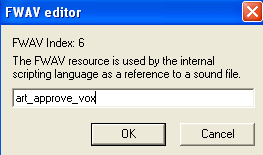
Fig. 1.51
Continued on Next Page . . .
|