WEEK 3: Object Behavior Modification and Adding MotivesCompleting The Chair (continued)The arrows tell us that this painting can play sounds 0 through 4 and run animations 1 through 4. As to what those animations and sounds are, we'll find out in a minute. Note: Depending on your painting, you may not have animations and sounds 0 through 4; but you will have lines that reference sounds and animations. Everyone has their painting ready to go, we've looked at the behavior containing lots of confusing lines, and now it is time to find out what these animation and sound id's are, because I don't know about you, but "Animate Sim (id 3 from object), and Play Sound Event (id=0) doesn't tell me a heck of a lot. Maxis is more evil than I. WORKING WITH SOUNDS AND ANIMATIONSClick OK to get out of the behavior. We are going to explore a new section of IFF called STR# (string). Select the STR# section, and look to the right.
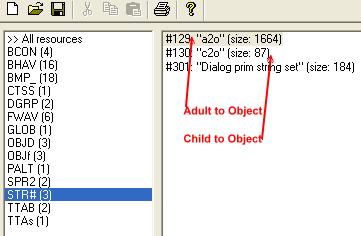
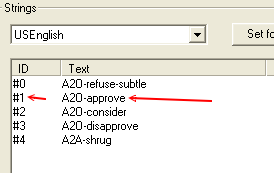
We will completely cover sounds and animations in the Intermediate Level classes, so we will not be going into great detail at this time and therefore, a brief explanation will only be covered today. Notice to the right we have #129: "a2o" and#130: "c2o". Translated, they are Adult to Object animations and Child to Object animations, respectively. Double click on the adult animations, #129: "a2o".
|