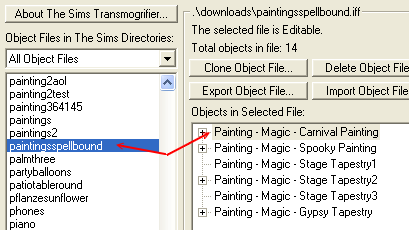
WEEK 3: Object Behavior Modification and Adding MotivesFinding The Right Painting (continued)Okay, let's pick the right one this time. I'm going to be nice about the whole thing and tell you which painting it is. Just keep in mind that had you been on your own, you probably would have to do the above exercise a few times before getting it right. Or, maybe not; but in any case, the point I'm trying to make here, is that you must never forget Rule #4: NEVER give up. Nobody said this would be a piece of cake, and there is very little, if any, help out there. As hackers, we have a very small, but tightly knit community, and although we try to help each other out whenever possible, sometimes the help is not always swift in coming. Alas, the reason is, none of us has all the answers. And even those people you might look up to as "Gurus", are only good up to a certain point, and then they themselves need help. I've worked on objects that have taken me over 8 full months to complete because I couldn't get help. But I never gave up. Keep that in mind. Moving right along, everyone should have Tmog 2.0. Open up Tmog, and depending on the expansion packs you have installed, you will be looking for a certain painting. Look below to determine which painting you should be after: Makin' Magic: If you have Makin' Magic installed, look for paintingsSpellbound.iff. You'll notice over in the right hand side that the file contains several paintings. You want to clone the first one, Painting - Magic - Carnival Painting.
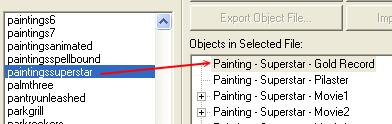
Once you clone your painting, sit tight while we find the correct painting for the others. Super Star: If you have Super Star installed, but NOT Makin' Magic, the painting you want is called Painting - Superstar - Gold Record. Scroll down in Tmog until you see "paintingssuperstar" on the left and to the right you'll see all the paintings in that file. You want to clone the first one, Paintinf - Superstar - Gold Record.
Clone the painting, and then wait for the rest to find their painting.
|