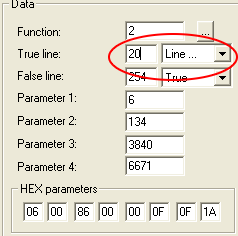
WEEK 3: Object Behavior Modification and Adding MotivesADDING MOTIVES (continued)We are going to make it read as follows: Line 2 goes to Line 3 Everyone get that? Fine. Let's redirect these little lines so that our chair will work the way we want. Select LIne 3, and from the Data box to the right, change the number 4 to a 20.
Select Line 20. Notice that the Line already goes to 4, so we can leave this one alone.
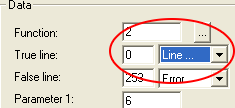
Move up to Line 4 and select it. This was the "ending" line. Look at the True/Error statement at the end.
With Line 4 still selected, go to the Data box and change True to "Line".
|