WEEK 3: Object Behavior Modification and Adding Motives
INCORPORATING OUR NEW SOUND AND ANIMATION (continued)
Next, get rid of the 3 in Parameter 3. Change it to a zero (0).
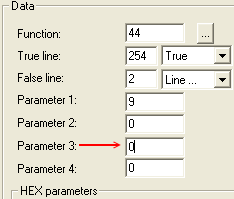
Fig. 1.58
Now look at Line 2:
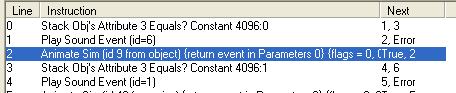
Fig. 1.59
The line is now calling Animation 9 from our object, just
as we intended.
Click "OK" to get out of the window, SAVE your file, and EXIT IFF.
Note: So, how come we used a painting for the
animations and sounds? We didn't have to. Any object with
the ability to invoke the reactions we want would suffice. There is also
Animation Alchemist, and while easy to use, the program isn't suitable for every
hack because the only thing the program accomplishes, is changing
existing animations. We added to what was already present. Often,
we need to go by way of Detroit to accomplish the task at hand, even if that means
using a Hex editor (which would be to your advantage to learn at some point).
Time To Test
Test the chair in your game. Test it to some extent because we are looking
to see if Sims will react the same no matter their personality. You will not get
an enthusiastic "Hooray!" from them, but you should definitely get some
type of approval.
When back from testing, proceed to this week's assignment.
Until next we meet,
Grapholina
|