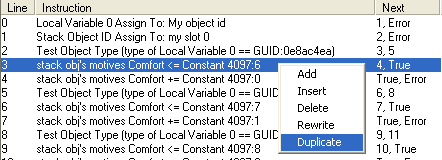
WEEK 3: Object Behavior Modification and Adding MotivesADDING MOTIVES (continued)Alright, then. Here we have Behavior #4113, and the lines pointed to by the red arrows are the lines we want to duplicate. I know those are the lines because my chair's GUID line points to those two.
Notice that Line 2 is testing to see if that is our chair. If it is, the script continues to Line 3, and if it isn't, it jumps to Line 5 to check if that is the correct chair. Line 3 is our chair, so we ignore the "if it isn't" instruction and look at Line 3. That line says to move to Line 4 or nothing at all (4, True). Get in the habit of reading your code. Don't do things 'just because'. The more you read, the more second nature reading code will become, the better at hacking you will be. Note: "Stack Obj" means the object in question. In this case, it is the object (our Sim) in slot 0 of our chair. Select Line 3, right-click over it, and then select "Duplicate" from the menu.
Do the same with Line 4. Select it, and then duplicate it. We now have 21 Lines of code, right?
|