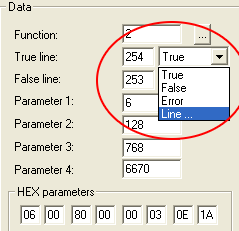
WEEK 3: Object Behavior Modification and Adding MotivesADDING MOTIVES (continued)Notice that the True/False line is saying "True" and "Error". We need to change this because if we left it as is, the behavior would stop running at this point and ignore our second Hunger line. The line that tells the chair how quickly to increase hunger levels. Move over to the Data box, and change the "True" line to "Line" from the drop down menu:
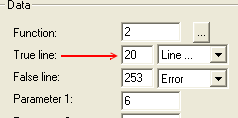
Insert the number "20" in that box:
Line 13 should read like mine depicted below:
|