WEEK 3: Object Behavior Modification and Adding MotivesADDING MOTIVES (continued)The next step is to tie in the lines so that they flow smoothly. We can't leave them like this or the game will get confused and possibly cause a crash. This next step can be somewhat confusing at first, so pay attention, and if you need to, read and re-read the following instructions until you see the light. Place your cursor on Line 7 to select it. It is currently going to Line 13, but we want to change it so that it jumps to Line 19.
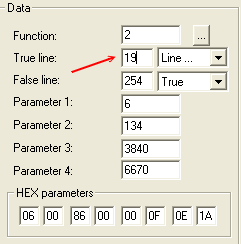
With your Line 7 still selected, move over to the Data box, and change where it says "13" to 19, like so:
The next line we want to look at is Line 13, because that's where our new Line 19 jumps to. Look at the line:
|