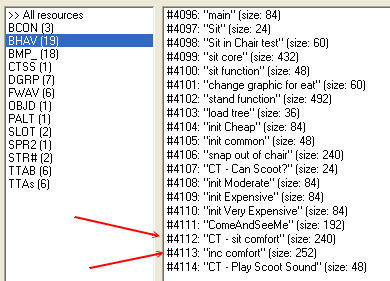
WEEK 2: Enhancing MoodsEXPLORING BEHAVIORS (continued)Alright. Click "OK" to get out of this very nasty and worthless behavior window, and get back to the main Behavior screen. Let's see what we have here. Lookit! There's something about comfort right there! Both of these behaviors will give us insight as to where we need to modify our comfort levels for the chair. We'll look at both.
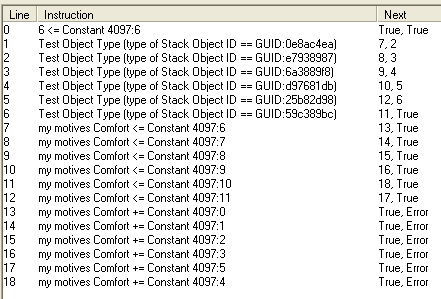
Double click #4112 "CT - sit comfort". Once inside the behavior, right click to select "Rewrite" from the menu. We should then see something like this:
In the behavior we can see some GUID numbers and my motives Comfort lines that point to "Constants". The reason I said your screen will look "something" like the above picture is because your GUID numbers and mine will not be the same, and we'll see exactly why they are not the same in just a moment. Notice the True/False statement on the very first line. They do not lead to any of the other lines in this BHAV. All of the other lines here are extra, never being accessed at all. In fact, this first line returns a "True" no matter what so we know this is a dummy BHAV that Maxis added in for their own mysterious purposes. NOTE: While we aren't going to let ourselves get distracted just now it should be noted that BHAVs starting with "CT-" should be left in the object and not renamed as the "CT" is an indication that Maxis is doing it's own 'mysterious purpose' type things there. We'll save the unraveling of those mysteries for Advanced Level Hacking.
|