WEEK 1: PRECURSOR: A Brief Look Into Our Essential Tools
Author: Grapholina
far out
Far Out is a file extraction program and in my opinion it is the best one available
for use. There are others such as Far Edit, FarX, etc. You may use them if you
wish, but the lessons have been written using Far Out. Unless you are quite familiar
with extracting files from globals, I suggest that you humor me once more and
use Far Out. This is the Far Out interface:
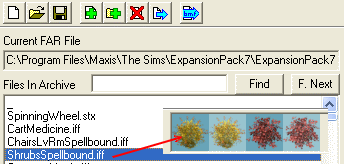
Fig. 1.10
Not all extraction programs do this, but Far Out does. When you select a file,
Far Out shows you thumbnails of the object you selected in its right-hand side
panel.
Far Out is used for file extractions and also to create your own Far files.
Putting your downloaded or created objects into a Far file tremendously speeds
up game loading time.
This concludes our brief tour of the tools we use. Before we continue on to
our first lesson for this class, I'd like to make a suggestion. If you are serious
about hacking, if you believe you will continue to hack objects, remove any and
all user-created objects you have either downloaded or made from your User Objects
folder in your game. As hackers, this is not the place to keep our objects. All
our tools pull files from the "Downloads" folder of
your game, and there is where you should keep your Far files and loose objects
you've created or downloaded.
Important: Never, ever have any
of these programs open while you are running your game. Close all programs before
you attempt to launch The Sims. If you do not, the results can be disastrous and
at the very least, you will damage objects or get the dreaded "Some Objects
are Missing and Could Not be Loaded" screen.
|